1. What is an Agent according to me?
An agent is just an LLM being operated in a loop with tools and guardrails. Since we know that LLMs are just token machines—taking tokens as input and returning tokens as output—they cannot explicitly call external APIs or perform database operations on their own.
So, if they are given access to locally defined tools, here is what they can do:
They can understand the purpose a particular tool serves and, based on user input, determine whether to tell the backend that a specific tool needs to be called. This is the surface-level explanation of how agents work. Let's dive deeper and understand the actual mechanics behind this entire process.
2. Why there is a need for agents in the market.
They make human life easier by handling repetitive tasks in a faster and more accurate way.
The world is shifting toward agents performing tasks while humans act as supervisors in every domain.
3. How they actually work.
Every LLM provider (e.g., Groq, OpenAI, Anthropic) uses a specific payload structure when invoked. Since most providers support the OpenAI-compatible format, the standard request structure looks like this:
response = openai.chat.completions.create(model=" ", messages=" ", tools= " ")Where model specifies the target model, such as "gpt-4o-mini",
messages contains the conversation payload—introducing the core concept of CONVERSATIONAL HISTORY—and tools accepts a list of tool objects, which is covered in detail below.
4. What is CONVERSATIONAL HISTORY IN AN LLM AND WHY DOES IT BECOME SO IMPORTANT
A common misconception is that LLMs are stateful—meaning they store your details from past interactions somewhere and retrieve them as the conversation progresses to maintain context.
That is a myth. LLMs are stateless. They do not retain or extract information in the background across separate calls to generate responses. However, there are nuances when we introduce Short-Term Memory (STM) and Long-Term Memory (LTM), which we will cover shortly. For now, keep in mind that LLMs do not inherently store state. So, how do they seem to remember us?
That is where conversational history comes into play. Before diving deeper, I recommend using an LLM directly via its API if you haven't already. As a developer, you should work directly with APIs rather than relying solely on consumer web applications.
When invoking an LLM via code, you make calls like:
response = openai.chat.completions.create(model =" ", messages = " ", tools = " ").Here, messages receives an array structured like this:
1. ["role": "system", "content" : "Behave like a funny guy"]2. ["role" : "user" , "content" : " Hey i am chetan Wadhwa, how are you ? "]First, you define how the LLM should behave using the system role, which is equivalent to typing "Act like a senior software engineer" in a consumer chat interface.
Next, you pass your prompt under the user role, allowing the LLM to identify the incoming request.
The LLM then returns a response structured like this:
["role" : "assistant", "content" : "Nice to meet you Chetan, Hope you are talented enough to get a job"]If you send a follow-up request with a new user message on a fresh API call, the LLM starts with a completely blank slate and has no memory of the previous turn. This demonstrates why preserving conversation history inside your application logic is essential:
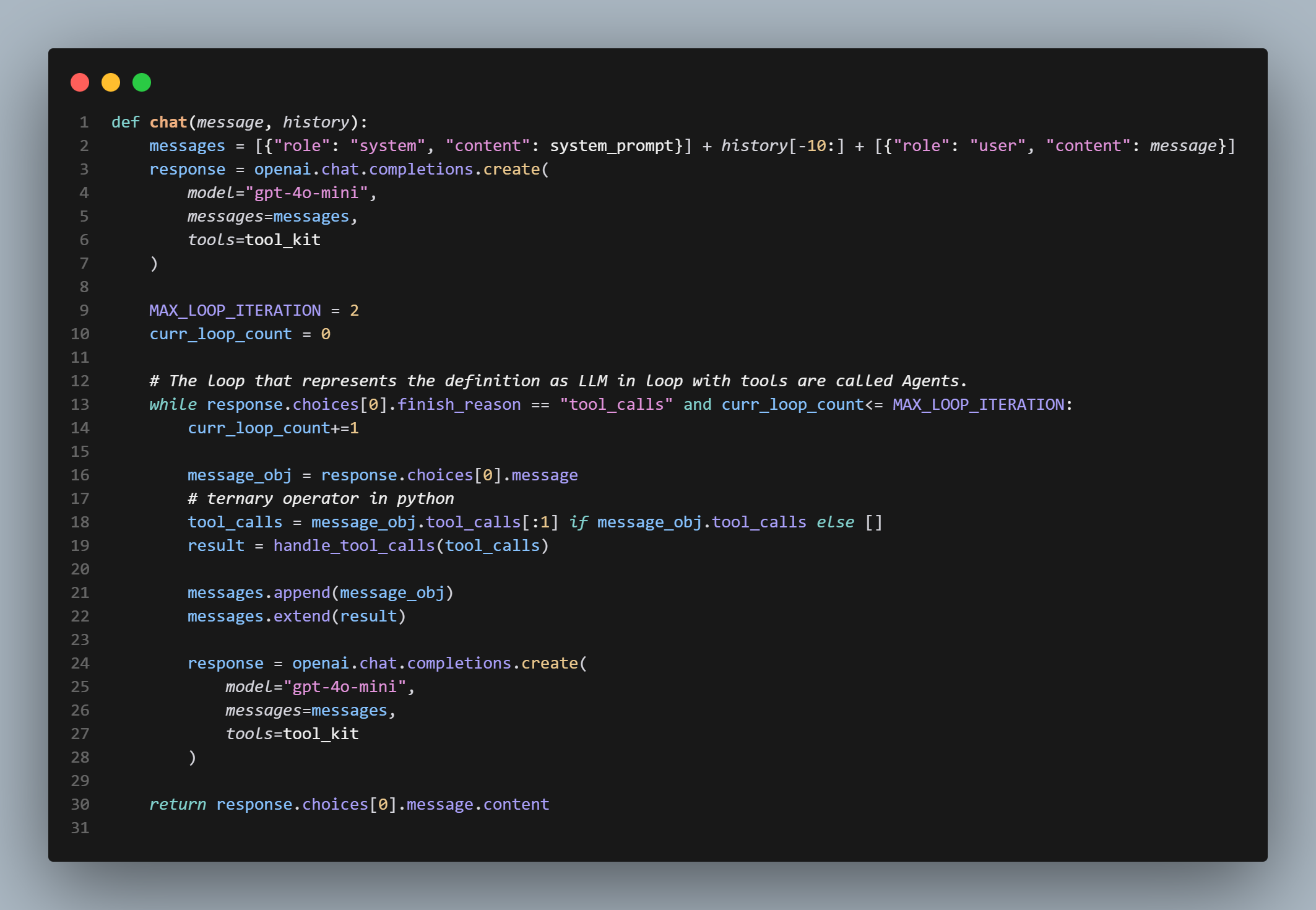
As shown above, the messages array sent in every request accumulates past turns—including system instructions, prior user prompts, assistant replies, and tool execution metadata—providing the LLM with the context required to continue the conversation.
Through hands-on testing, you can see how an LLM maintains context without actually persisting internal state. Now let's clarify how Short-Term Memory and Long-Term Memory fit into this picture.
5. LONG-TERM MEMORY VS SHORT-TERM MEMORY
Short-Term Memory: Within an active session or chat window, the maintained conversation history acts as Short-Term Memory. It keeps track of recent tool outputs, the active system prompt, and ongoing turn history.
It is ephemeral. Once the session ends or the chat is cleared, this in-memory context is lost.
Long-Term Memory: Long-Term Memory consists of stored summaries, user preferences, or persistent facts saved across sessions. These are stored in external databases like PostgreSQL, Redis, or Vector Databases (e.g., Pinecone) and retrieved via context lookup during relevant user queries.
For instance, if you delete a chat session in an application, the immediate context is cleared. However, when you start a new chat, relevant persistent summaries retrieved from external storage allow the system to recognize key details about you.
Now that we have covered memory concepts and context management, let's explore how tool execution actually happens. There is a common misconception that developers pass raw functions to an LLM for direct execution. Since LLMs are token-in, token-out models, they do not execute code directly. Here is how tool calling actually functions behind the scenes.
6. TOOL EXECUTION
You define local backend functions and supply matching JSON declarations to the LLM schema. For example, here are the 2 tools configured in CarbonCopy (my digital replica):
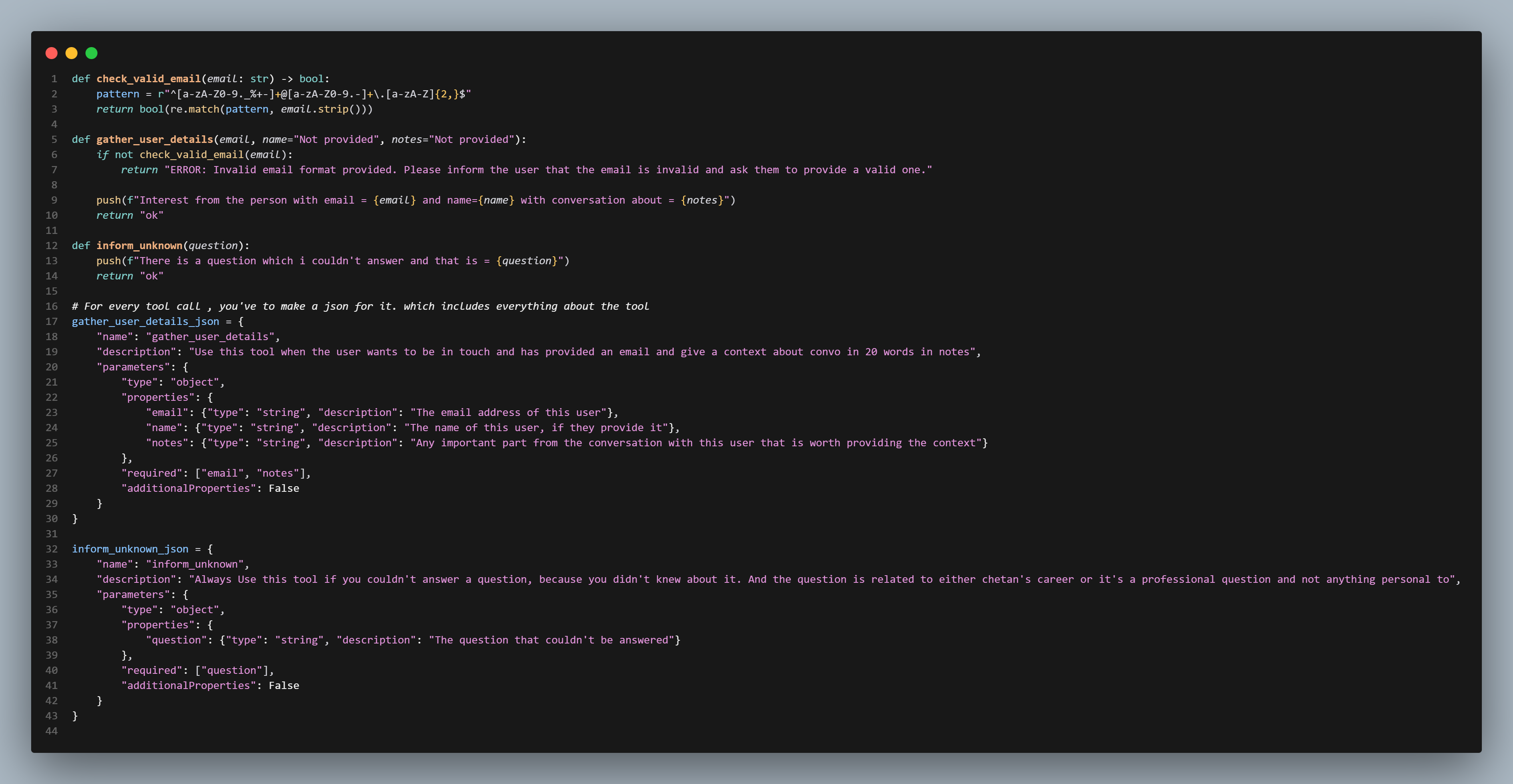
1. The schema structure includes: The function name (when the LLM determines a tool is needed, it returns a structured JSON payload containing this exact name).
2. The description: This is the critical part of the schema definition. It guides the LLM on when and why to invoke the tool. Clear description engineering prevents false positives (unnecessary tool calls) and false negatives (failing to call a tool when expected).
3. The parameters: This defines the expected inputs—including required and optional fields—allowing the LLM to extract or request missing details from the user before outputting the arguments.
-> When the LLM decides to trigger a tool, response.choices[0] from response = openai.chat.completions.create(...) will look like this:
Choice(
    finish_reason='tool_calls',
    index=0,
    logprobs=None,
    message=ChatCompletionMessage(
        content=None,
        role='assistant',
        function_call=None,
        tool_calls=[
            ChatCompletionMessageToolCall(
                id='call_abc123xyz78901234',
                function=Function(
                    arguments='{"sender_email": "recruiter@techfirm.com", "sender_name": "Sarah", "notes": "Interested in interviewing Chetan for a Full-Stack Software Engineer role"}',
                    name='send_telegram_alert'
                ),
                type='function'
            )
        ]
    )
)
Notice that content is None and finish_reason is set to "tool_calls".
Once this response object is received and finish_reason == "tool_calls" is detected, the execution loop takes over. This control loop is what turns an LLM with tools into an active agent.
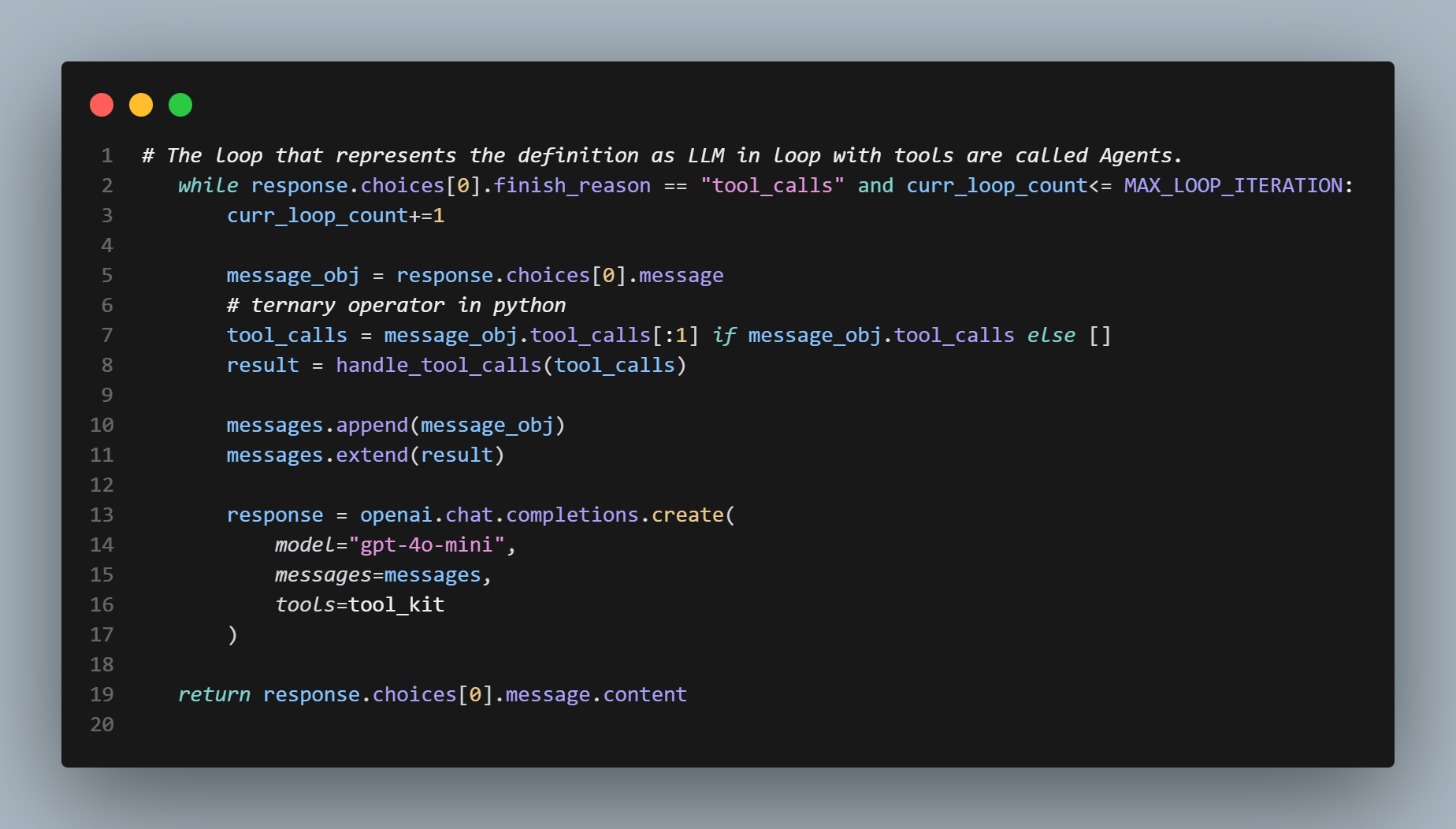
Let's examine how this process is handled inside CarbonCopy's architecture.
7. My Digital Replica.
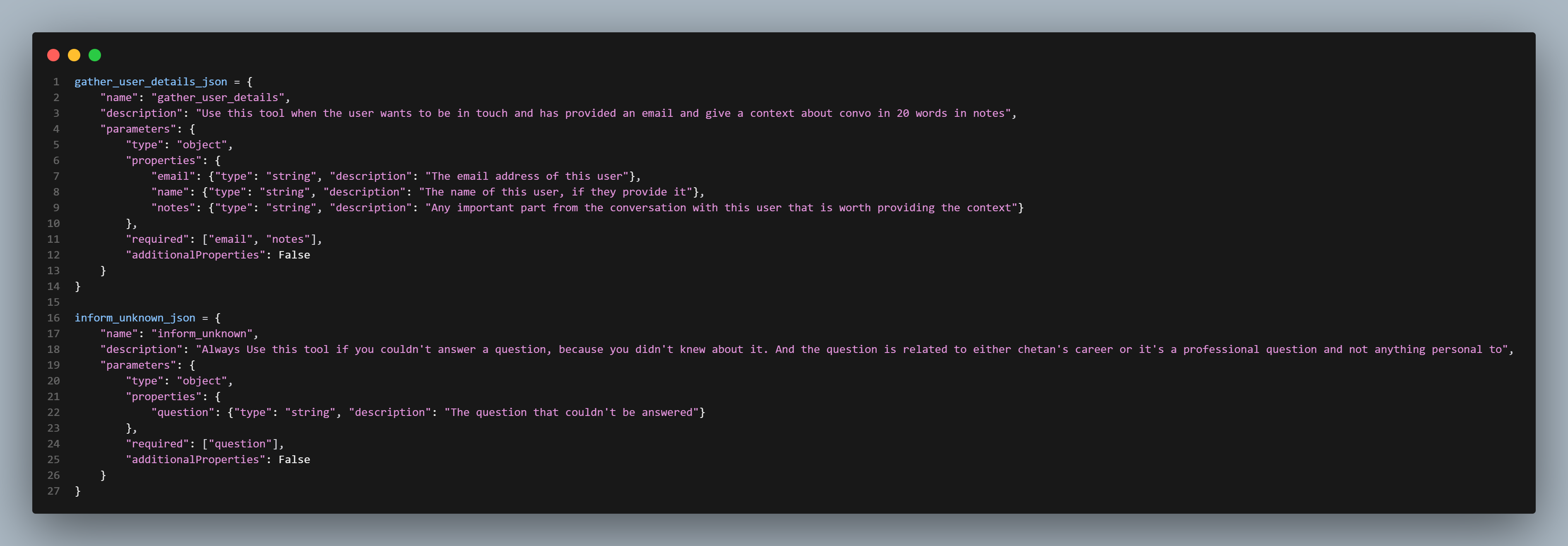
Here are the two function schemas registered for the replica:
The first schema (gather_user_details_json) handles contact collection. Because email and notes are marked as required fields, the LLM prompts the user for their contact email and message context before generating the tool call arguments.
&
The second schema (inform_unknown_json) triggers when a user asks a valid professional or technical question that falls outside the replica's current context. It extracts the missing query details and calls the tool, dispatching a notification to alert me to update the agent's knowledge base.
This handles edge-case queries gracefully without providing inaccurate information.
Designing these tools required testing and adjusting descriptions to ensure reliable tool selection.
-> Both schemas are bundled into a tool array: tool_kit = [ {"type": "function", "function": gather_user_details_json}, {"type": "function", "function": inform_unknown_json} ]
This matches the standard OpenAI payload format: and tool_kit is passed during the API request:
response = openai.chat.completions.create(
            model="gpt-4o-mini",
            messages=messages,
            tools=tool_kit
        )
-> If finish_reason returns "tool_calls", the backend routes the execution payload to a dispatcher function containing an conditional check matching the requested tool name with its corresponding local Python function.
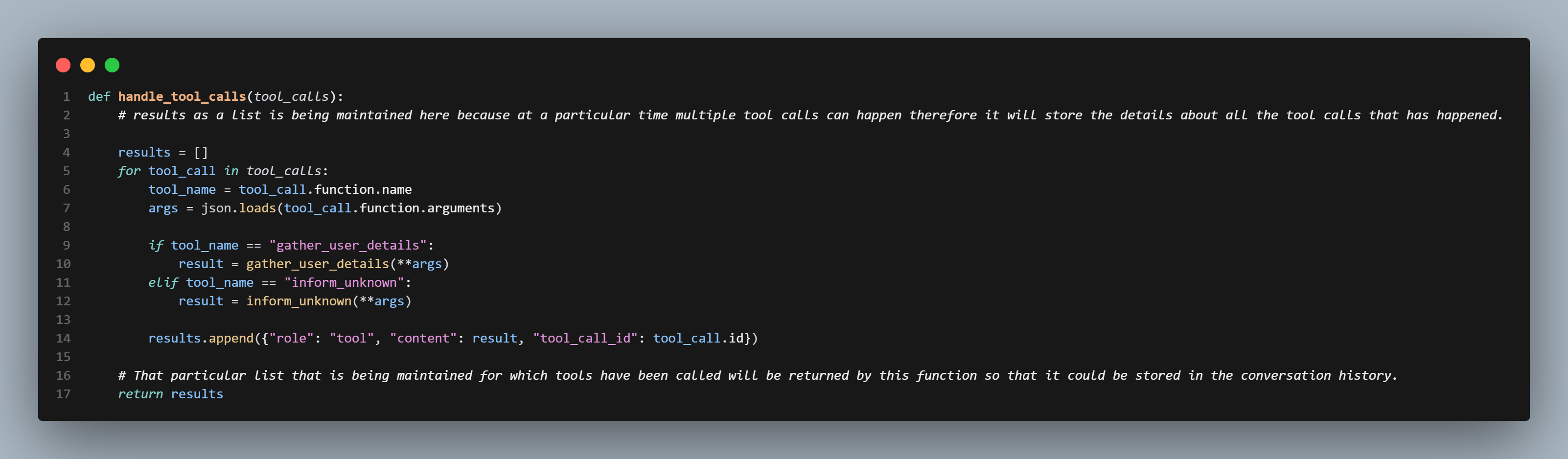
-> The handle_tool_calls function receives the tool_calls array extracted from the LLM's response object.
It iterates over the list, matches the function name, and executes the target backend function using the provided arguments.
In CarbonCopy, there are two primary backend functions:
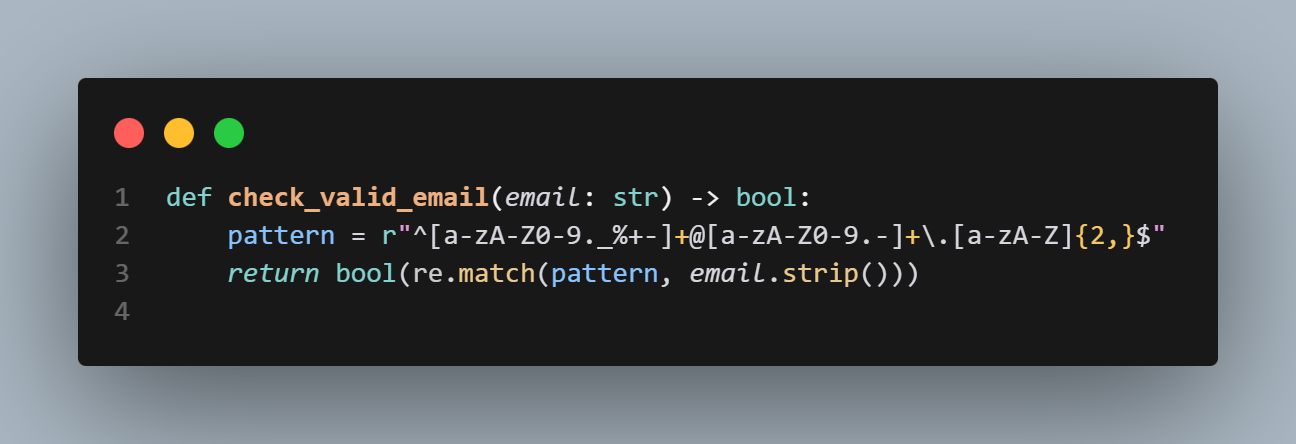
The first function, check_valid_email, validates the provided email format. This validation step can be extended to include OTP verification to ensure incoming contact requests are genuine.
The return value of this tool function plays an important role in the loop, as explained below. If validation fails, it returns an explicit error string: "ERROR: Invalid email format provided. Please inform the user that the email is invalid and ask them to provide a valid one."
(The reason for returning detailed error strings is discussed in the next section.)
If the format is valid, it returns "ok".
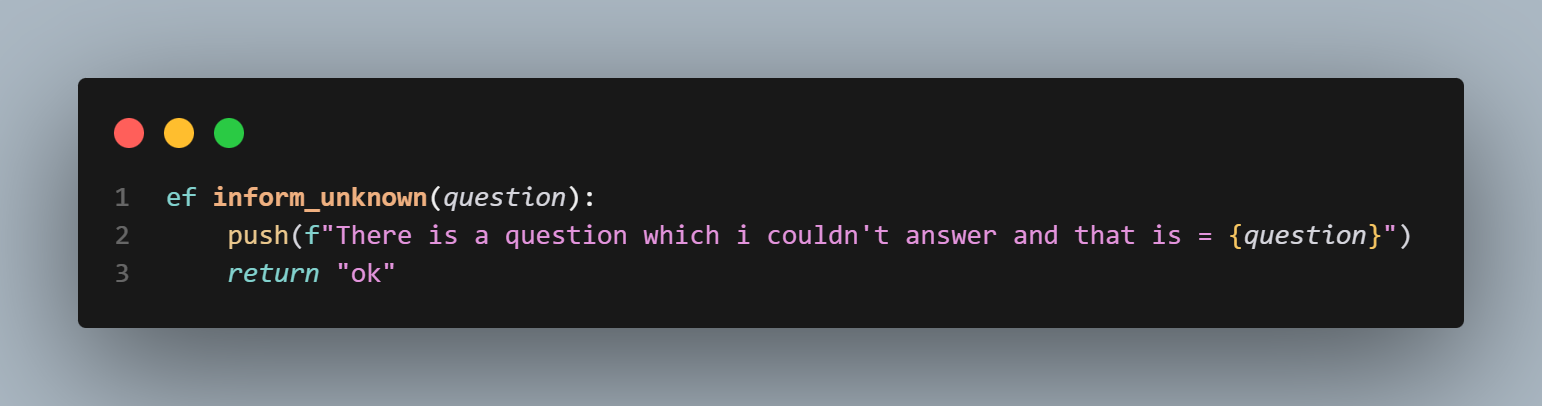
The second function routes the unknown query payload to the push notification handler and returns "ok".
Now, let's look at how push() handles notification delivery.
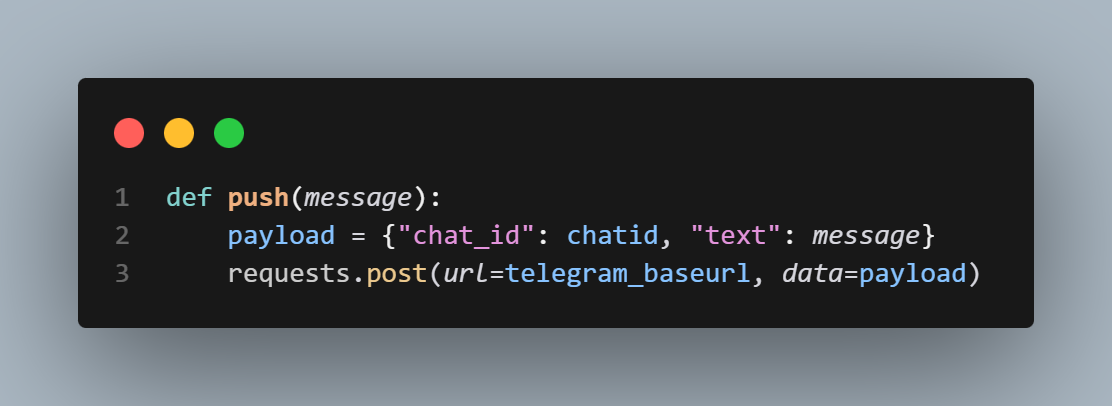
This function routes alert messages to my phone via a messaging service.
Evolution: Initial development used Pushover during its free tier. Once that expired, I migrated the implementation to the Telegram Bot API.
The function now sends HTTP POST requests to the Telegram API using Python's requests library.
That covers the notification delivery logic.
-> Why returning execution results back to the LLM is critical: Beyond system, user, and assistant roles, the OpenAI format includes a tool role structured as follows:
{"role": "tool", "content": result, "tool_call_id": tool_call.id}Here, content stores the string returned by your local function (e.g., "ok" or an explicit error message).
The tool_call_id field maps the result directly back to the specific tool invocation generated by the LLM.
Inside handle_tool_calls, each tool response dictionary is appended to a results list, which is then returned to the main iteration loop in app.py.
-> A key structural requirement in the OpenAI API loop: The assistant message containing the tool call request (message_obj) MUST be appended to the messages array BEFORE appending the tool execution results.
Let's clarify why this order matters.
In the chat handler, messages maintains the overall conversation history.
Inside the loop, the sequence is: messages.append(message_obj) followed by messages.extend(result) Where result is the array of tool outputs returned by handle_tool_calls. The order is strict:
When the LLM receives the updated conversation history, it needs to verify that the incoming role="tool" message corresponds to an earlier assistant message with finish_reason == "tool_calls". If tool outputs are appended without the preceding assistant tool-call request, the API throws an error indicating an orphaned tool response.
The control loop continues iterating until the LLM receives a satisfactory tool output and returns a final text response to the user. To prevent runaway loops and control token costs, specific boundary conditions are applied.
The optimizations
The while loop exits under two conditions: when the model returns a final textual response (finish_reason == "stop"), or when reaching a maximum iteration guardrail of 2 turns. Since the setup currently uses 2 registered tools, limiting loop turns prevents infinite execution.
In the Gradio interface, server queue concurrency is capped at 3 to manage concurrent user sessions effectively.
That covers the complete breakdown.